
HotelXray Blog
Stop Refreshing Hyatt: Rate and Award Alerts That Show Every Check
Set a Hyatt cash or award alert, watch flexible dates and suites, see every check, and get an email when HotelXray finds a match.
Last updated
The award you want is gone, or the cash rate is still too high. You could rerun the same Hyatt search every few hours for the next three weeks. Or set one alert and let HotelXray watch the dates.
Watch cash prices, standard rooms or suites, then open the check log to see each result along the way. Alerts live in the HotelXray side panel, alongside your rate comparisons.
Step 1: Open the alert form
Start with a hotel you are already viewing. You can open the alert form in two places.
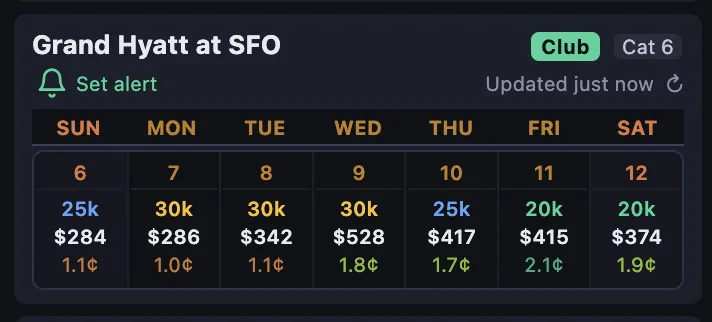
From a search result, the bell sits under the hotel name, next to its category and club badges. Its tooltip reads Set alert for this hotel.
From a hotel’s calendar, open a night and the bell sits in that day’s header, above the breakdown for a room, a standard suite and a premium suite. Its tooltip reads Set alert for this night.
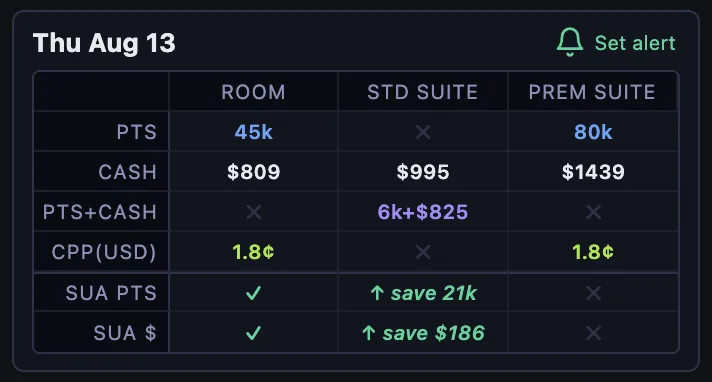
Both bells open the same form.
Sign in with your email address to save alerts and receive matches. HotelXray never asks for your World of Hyatt credentials.
Step 2: Configure the alert
One form covers the whole alert. It opens with the property’s award chart, then works down through what to watch and what counts as a match.
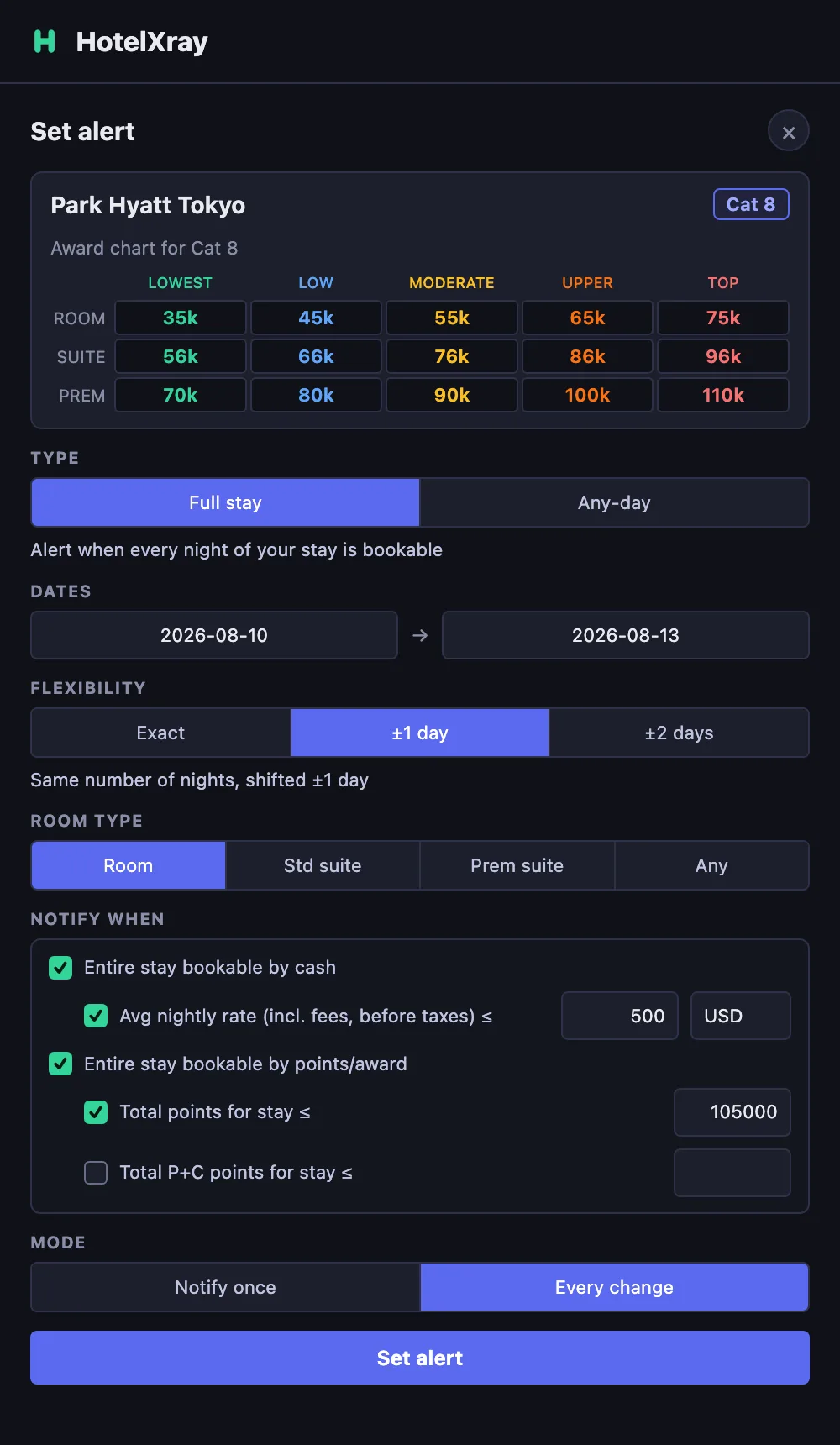
Use the award chart to choose a points budget. It shows nightly prices for a standard room, standard suite and premium suite, from Lowest to Top. For a multi-night alert, set your target for the total stay; the chart’s prices are per night.
Type: the whole stay, or any single night
Full stay watches for every night of your stay being bookable, over a range of up to 30 days. Choose it when you need the whole trip together; you can add date flexibility below.
Any-day watches for any single night in your range appearing, over a range of up to 7 days. Choose it when you want one night at a hard-to-book property and the date is negotiable.
The type also changes what a points target means. On a full-stay alert it is the total for the stay. On an any-day alert it is the price of one night.
Dates and flexibility
Dates set the range you want watched, within the limit for the type you chose.
Flexibility widens a full-stay alert by ±1 or ±2 days while keeping the same number of nights. A three-night stay with ±1 day also matches the three nights starting a day earlier or a day later. Any-day alerts are always exact, because the date range already provides the flexibility.
Room type
Room type points the alert at Room, Std suite, Prem suite or Any. Any matches on the lowest value across those three, so it is the setting to use when you want the best price regardless of category.
Notify when: what counts as a match
Choose the booking options and prices you would accept:
- Entire stay bookable by cash, at any price.
- Average nightly rate at or below your number, including fees and before taxes, in the currency you choose.
- Entire stay bookable by points or award.
- Total points for the stay at or below your number.
- Total Points + Cash points at or below your number.
HotelXray joins the checked conditions with “or”. An alert with a cash target and an award condition emails you when either one is met, not only when both are.
A threshold narrows the condition above it instead of adding a separate trigger. If you choose “entire stay bookable by cash” and set a maximum nightly rate, a stay that becomes bookable above your maximum will not notify you. You hear about it only when it is bookable and within your budget.
Mode: notify once, or keep watching
Notify once suits a one-off booking decision. Every change keeps the alert running after the first email, which is what you want when you have booked a refundable rate and would like to hear about another drop.
Step 3: HotelXray checks the dates, and records every check
Save the alert and close the tab. HotelXray checks your dates in the background and emails you when a check finds a match.
Each alert keeps an Alert check log: when each check ran, the cash rate and total points it found, and which results matched your conditions. A green check marks a value that met your target. No Award Night Available or No Award Stay Available tells you that the check found no award space for those dates.
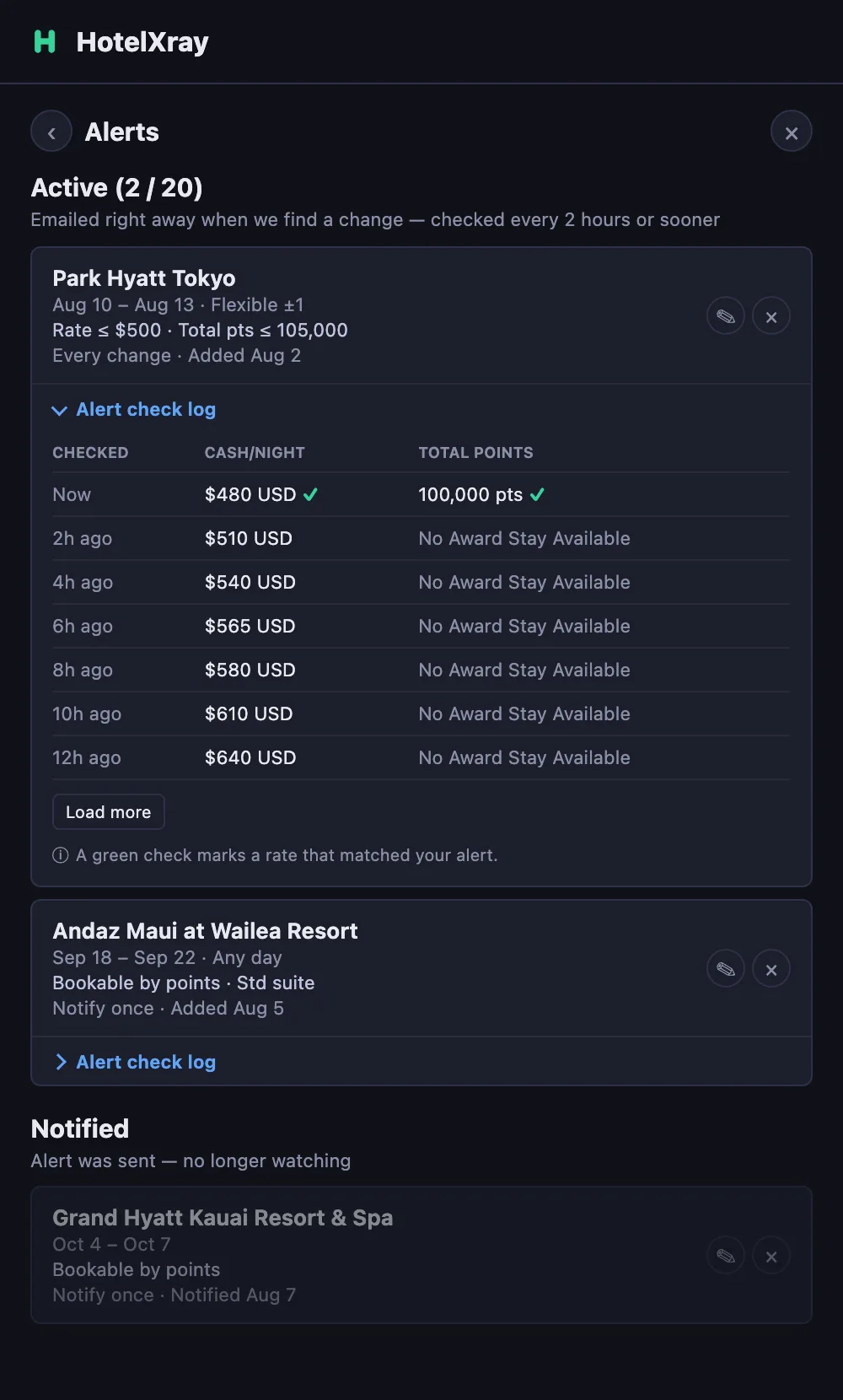
You can follow the price before it reaches your target. Open the log to see when HotelXray last checked, whether award space appeared, and how the cash rate moved. That history helps you decide whether to keep waiting or adjust your budget.
Step 4: The email tells you what matched
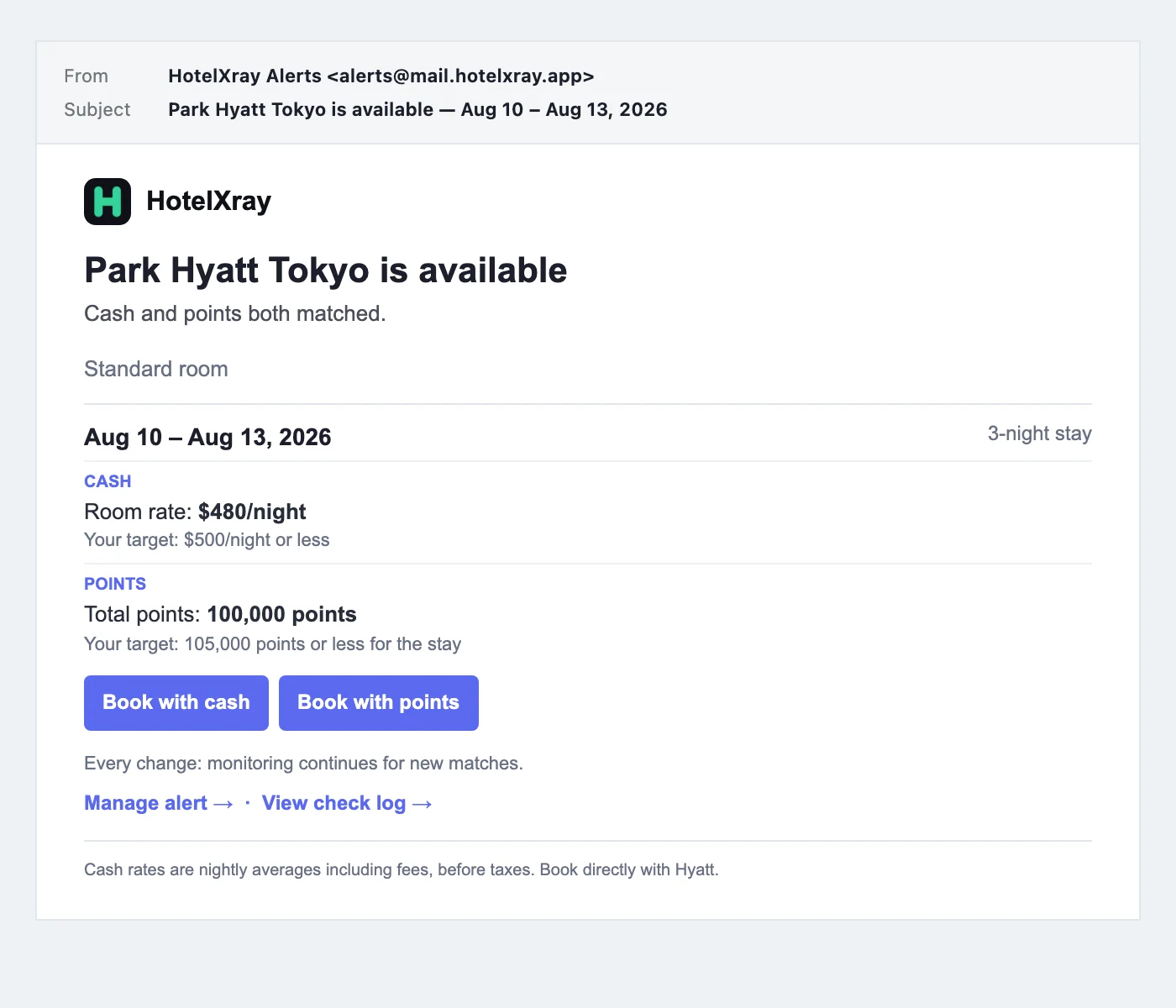
When a check matches, the email gives you the stay, the value that matched, and a way to act on it:
- A subject line naming the hotel and dates, such as Park Hyatt Tokyo is available — Aug 10 – Aug 13, 2026.
- A short summary of which conditions matched, followed by the room type and stay dates.
- A separate result for each match, with the observed value and your target on its own line.
- Book with cash and Book with points buttons that open the matched stay on hyatt.com.
- Manage alert → and View check log → links, which sign you in and open that alert.
If several of your alerts match in the same run, you get one email covering all of them rather than one message per alert. HotelXray also sends a short confirmation when you create or change an alert, so you know monitoring has started.
What happens after an alert fires
An alert set to Notify once moves to Notified and stops watching those dates. One set to Every change stays active and keeps reporting as the rate moves.
An alert moves to Dates passed when no watched dates remain bookable. With flexible dates, it can keep watching after the original check-in while a later candidate stay remains.
Review, edit and delete alerts in the side panel, or from your account on the web, where each alert carries its own check log.
Details worth knowing
- Alerts monitor a stay for two adults.
- Cash targets use the average nightly rate, including fees, before taxes, so the number you set stays comparable across stays of different lengths.
- An alert watches one hotel. To compare several properties over the same dates, set one alert each, or use the side panel’s search calendar, which is unlimited.
Explore calendars, suite comparisons and lounges in the Hyatt product overview. The same extension also offers Marriott rate and award alerts.
See more when you search Hyatt or Marriott
Compare cash and points across the month, check lounge details, and create rate or award alerts.
Add HotelXray to Chrome